⌨︎
Tabs that survive drops
xterm-based terminals with search and session restore. When Wi-Fi blips, tabs reconnect on their own and keep their scrollback.
Mac · iPhone · iPad
Brama is an SSH and SFTP manager for people who live in terminals. Jump hosts, port forwarding, AWS/Azure/GCP discovery, Kubernetes contexts and incident recording on the Mac, and your servers in your pocket on iPhone and iPad. Your passwords stay in the Apple Keychain.
Free on the Mac · No account · No telemetry
ubuntu@prod-api-1:~$ uptime
 14:02:11 up 41 days,  3:12,  1 user,  load average: 0.84, 0.77, 0.69
ubuntu@prod-api-1:~$ df -h /
Filesystem      Size  Used Avail Use% Mounted on
/dev/nvme0n1p1   97G   29G   68G  30% /
ubuntu@prod-api-1:~$ sudo systemctl status api --no-pager | head -3
● api.service - API server
     Loaded: loaded (/etc/systemd/system/api.service; enabled)
     Active: active (running) since Mon 2026-09-21 09:14:02 UTC
ubuntu@prod-api-1:~$
Built for daily SSH work: fast to open, keyboard-first, and quiet until something needs you.
xterm-based terminals with search and session restore. When Wi-Fi blips, tabs reconnect on their own and keep their scrollback.
Browse, upload and download next to your terminal, side by side with your local files.
Reach private servers through a bastion, like ssh -J. Each hop uses its own credentials.
Open a local tunnel to a remote database or dashboard in two clicks. Tunnels come back after a reconnect.
CPU, memory and disk usage next to every connected host, so you can spot the busy one at a glance.
See your keys and fingerprints, create Ed25519 or RSA keys, and install a key on a server with one click.
Open a terminal pinned to one cluster and namespace. It never changes your global kubectl context.
Record terminal output, connection events and notes during an outage. Pause, resume, then export a report.
Organize hosts into groups, import from ~/.ssh/config, and jump anywhere with ⌘K.
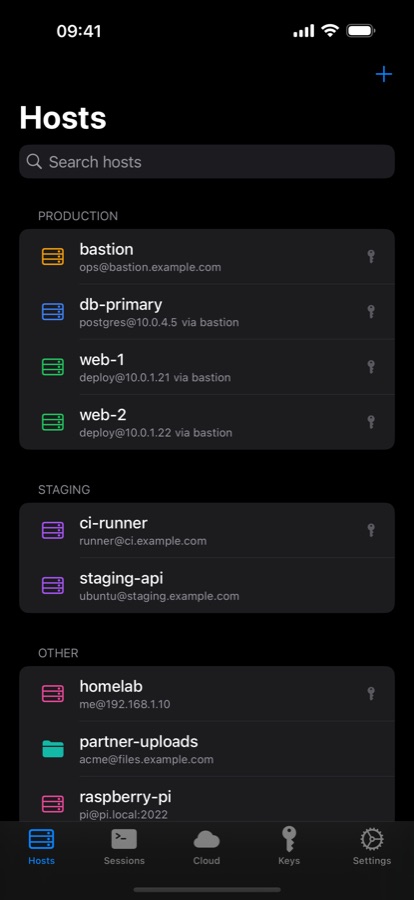
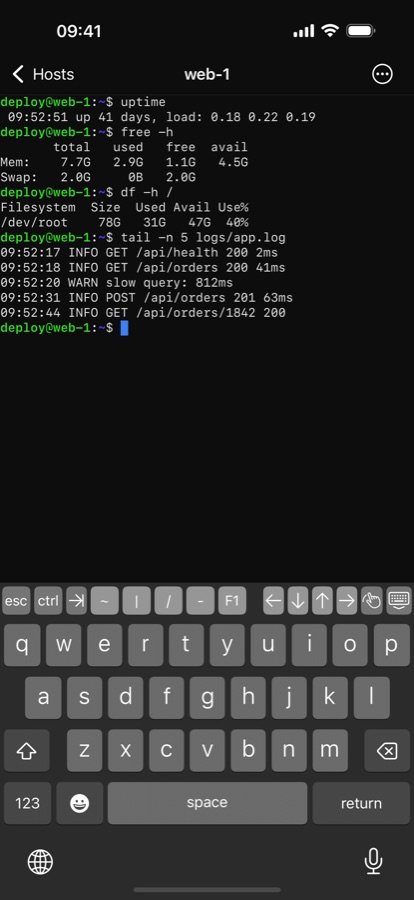
iPhone & iPad
Brama for iPhone and iPad brings the terminal and file browser with you, and keeps your host list the same everywhere.
Coming soon to the App Store.
Get it on the App StoreCloud discovery
Point Brama at the credentials you already use. It lists your instances and connects without copying IPs around.
az login or a service principal.AI access, on your terms
Brama includes an MCP server, so Claude and other assistants can run commands in the sessions you already have open.
No account and no telemetry. Brama has no servers of its own: it connects only to your servers, your cloud APIs, and, if you turn on sync, your own iCloud.
Passwords and passphrases are stored in the macOS Keychain, never in files or logs.
Lock Brama when you step away, or require Touch ID every time it starts.
Unknown host keys are shown for you to confirm, and your ~/.ssh/known_hosts is respected.
Export your hosts and credentials into one password-protected file (AES-256).
Brama for Mac is free. On iPhone and iPad, your hosts are free and Brama Pro unlocks connecting.
Coming soon to the App Store.
Prices in US dollars; the App Store shows your local price.
Free. Download the disk image for your Mac, open it, and drag Brama to Applications.
Not sure which? Apple menu → About This Mac → Chip. If it says “Apple M…”, pick Apple silicon.
Yes. Every feature of the Mac app is free, with no account and no time limit.
Connecting: the SSH terminal, the SFTP file browser and cloud discovery. Adding and organising hosts, keys and iCloud Sync work without it. Start with a 14-day free trial: no payment details, and nothing renews. After that, subscribe monthly or yearly; Apple handles billing and cancellation.
Between iPhone and iPad, yes: turn on iCloud Sync in Settings on each device, signed in to the same Apple ID. Sync with Brama for Mac is coming in a future Mac update. Hosts and passwords sync through your private iCloud; SSH keys don't. Import the same key on each device and Brama recognises it by its fingerprint.
Only to reach your servers and cloud APIs, and iCloud if you turn on sync. Brama sends nothing to us.
No. Brama is commercial, closed-source software. It still keeps everything on your Mac: passwords in the Keychain, hosts in a local database, and no telemetry.
Brama isn't notarized by Apple yet. Right-click Brama in Applications, choose Open, then confirm. You only need to do this once.
Yes. Brama reads your ~/.ssh/config, uses your existing keys in ~/.ssh, and trusts the host keys in your known_hosts.
In the Apple Keychain on each device, and end-to-end encrypted in your own iCloud if you turn on sync. Host settings live on your device. Nothing is sent to us, because there is no “us” server.
No. Brama is built for Apple devices: Mac, iPhone and iPad.